Zid Docs
Apps
ThemesPayments
Apps
ThemesPayments
Help Center
Slack
  1. Apps
  • πŸ—‚οΈ Overview
  • πŸš€ Start Here
  • Create your First App
  • Responses
  • Rate Limiting
  • Authorization
  • Embedded Apps
  • StoreFront Events
  • Zid MUI
  • Zid SDKs
  • Our custom MCP server
  • Merchant APIs
    • Account
      • Me
        • Me
        • Profile
      • Store
        • Store
        • Branding
        • Localization
        • Social
        • Operations
        • Business
        • Upload Logo Image
        • Delete Logo Image
        • Upload Icon Image
        • Delete Icon Image
        • Upload Cover Image
        • Delete Cover Image
    • Orders
      • Validate Order Request
      • Create Order
      • Change Order Status
      • Add Order Comment
      • View Order
      • List Orders
      • List Custom Order Statuses
      • List Order Credit Notes
    • Reverse Orders
      • Create Reverse Orders
      • Create Reverse Orders Waybill
      • Add Reverse Order Reasons
      • List Reverse Reasons
      • Calculate Reverse Totals
      • Create refund for reverse order
      • Upload bank transfer receipt
      • Update return products
      • Order Details – View for Return
    • Abandoned Carts
      • List Carts
      • View Cart
    • Products
      • Managing Products
        • Create Product Types
        • Create Product
        • List Products
        • View Product
        • List Product Settings
        • Update Product
        • Bulk Update Products
        • Delete Product
      • Digital Vouchers
        • List Vouchers
        • Order Vouchers
        • Create Voucher
        • Import Vouchers
        • Export Vouchers
        • Update Voucher
        • Remove Voucher
      • Product Categories
        • List Categories
        • View Category
        • Create Category
        • Create Subcategory
        • Update Category
        • Assign Product to Category
        • Bulk Assign Products to Category
        • Publish Category
        • Detach Category from All Products
        • Remove Product from Category
      • Product Badge
        • List Badges
      • Product Attributes
        • List Attributes
        • View Attribute
        • Create Attribute
        • Update Attribute
        • Delete Attribute
      • Product Attribute Presets
        • List Presets
        • Create Preset
        • Update Preset
        • Delete Preset
      • Product Variants
        • Create Variants
        • Create Custom Option
        • Update Custom Option
        • Delete Custom Option Field
        • Create Custom Input Field
        • Update Custom Input Field
        • Delete Custom Input Field
      • Product Sorting
        • Set Manual Product Order
        • Reset Manual Product Order
      • Product Images
        • List Images
        • Upload Image
        • Update Image Order
        • Delete Image
      • Product Availability Notifications
        • Notification Stats
        • Noticiation Settings
        • List Notifications
        • Create Notification
        • Update Settings
        • Send Notification Email
        • Export Notifications
      • Product Export
        • Email All Products to Store Owner
        • Import Products via CSV or xlsx File
      • Product Stock
        • Retrieve Product Stock
        • List Product Stock Records
        • Create Product Stock
        • Update Product Stock
        • Bulk Update Product Stock Records
      • Product Questions & Answers
        • Retrieve Product Question
        • Retrieve Product Answer
        • List Product Questions
        • List Answers for Question
        • Create Product Question
        • Create Product Answer
        • Update Product Question
        • Update Product Answer
        • Delete Product Question
        • Delete Product Answer
      • Product Reviews
        • List Reviews
        • Count Reviews
      • Digital Products
        • Create Downloadable Product
        • Generate Upload URL
        • Upload File to S3
        • Create Product Downloadable
        • Get Product Downloadables
        • Delete Product Downloadable
        • List Store Downloadables
        • Create Store Downloadable
        • Delete Store Downloadable
    • Inventories
      • Create Location
      • Update Location
      • Update Product Stock for Location
      • List Locations
      • View Location
    • Shipping
      • List Store Shipping Methods
    • Marketing
      • Coupons
        • List Coupons
        • View Coupon
        • Create Coupon
        • Generate Bulk Coupons
        • Duplicate Coupon
        • Duplicate Bulk Coupons
        • Update Coupon Note
        • Update Coupon
        • Update Bulk Coupons
        • Update Coupon Status
        • Update Bulk Coupons Status
        • Delete Coupon
        • Delete Bulk Coupons
      • Bundle Offers
        • List Bundle Offers
        • View Bundle Offer
      • Loyalty Program
        • Loyalty Program Status
        • Loyalty Program Details
        • Loyalty Program Info
        • Customer Loyalty Summary
        • Customer Points History
        • Activate Loyalty Program
        • Set Points Expiration Rules
        • Update Cashback Rule
        • Create Points Redemption Method
        • Update Points Redemption Method
        • Delete Points Redemption Method
        • Adjust Customer Points
      • Discount Rules
        • List Discount Rules
        • View Discount Rule
        • Create Discount Rule
        • Update Discount Rule
    • Customers
      • Customer Tags
        • List Customer Tags
        • Add Customer Tag
        • Ω’Update Customer Tag
        • Delete Customer Tag
      • List Customers
      • View Customer
      • Primary Customer List
      • FInd Customer By Phone Number
      • Customer Profile
      • Add Customer
      • Update Customer
      • Delete Customer
      • Add Bulk Customers
      • Import Customers
    • Store Settings
      • πŸ“„ User Roles and Permissions
      • Retrieve Store Manager Profile
      • Retrieve VAT Settings
      • List Payment Methods
      • List Store Operating Countries
      • OneSignal Store Settings
      • Create or Update OneSignal Store Settings
    • Countries and Cities
      • List Countries
      • List Cities for Country
    • Blogs
      • Settings
        • Create
        • List
      • Categories
        • Create
        • List
        • Bulk Activate
        • Bulk Deactivate
        • Bulk Delete
        • Retrieve
        • Destroy
        • Partial Update
        • Bulk Add To Posts
        • Bulk Remove From Posts
      • Posts
        • Media
          • List
          • Create
          • Destroy
        • Create
        • List
        • Retrieve
        • Partial Update
        • Destroy
        • Archive
        • Publish
        • Bulk Archive
        • Bulk Publish
        • Bulk Delete
        • Export Posts
        • Import Template
        • Import Posts
      • Tags
        • Create
        • List
        • Retrieve
        • Partial Update
        • Destroy
        • Bulk Delete Tags
        • Bulk Add To Posts
        • Bulk Remove From Posts
      • Storefront
        • Posts
          • List
          • Retrieve
        • Categories
          • List
          • Retrieve
        • Tags
          • List
  • Webhooks
    • Overview
    • Webhook Health Tracking
    • Events
      • Order
      • Product
      • Abandoned Cart
      • Customer
      • Product Category
    • APIs
      • Health Summary
      • Broken Webhooks
      • Recover Broken Webhooks
      • List Webhooks
      • Create Webhook
      • Delete Webhook
      • Delete Webhook By subscriber
  • App Management
    • Events
    • APIs
      • Subscription Details
      • Update Usage-Based Charges
  1. Apps

Rate Limiting

The Rate Limiting policy controls the number of requests an API will accept within a defined timeframe. Requests exceeding the set limit are rejected to maintain optimal performance.

What's New#

New Rate Limiting Rule: When any third-party system calls our API, we have introduced a restriction of 60 requests / Minute per application per store.

Quota and Throttling Policy#

The Throttling policy temporarily holds requests that exceed the rate limit, retrying them within a set timeframe. After multiple retry attempts without success, the request is finally rejected. You can adjust:
Retry Delay: The time between retries
Retry Limit: The maximum number of retries
This feature protects our backend, ensuring smooth performance for other users.

πŸ’‘ Exceptions#

We understand there may be cases that require exceptions. If you believe you have a valid case, please email us with details, and we will evaluate accordingly.

Zid's Rate Limiting Algorithm#

At Zid, we implement the Leaky Bucket Algorithm for rate limiting. Wikipedia describes this algorithm as follows:
From Wikipedia: The Leaky Bucket algorithm is analogous to a bucket with a small leak. It overflows if the inflow rate exceeds the leak rate or if an excess amount is added all at once. This algorithm is useful for ensuring that event sequences adhere to specified average and peak rates, thus managing any variations.
  Leaky Bucket Flow:
  - Incoming requests are queued as if being added to a bucket.
  - The bucket "leaks" requests at a consistent rate.
  - When the bucket is full, additional requests are rejected.

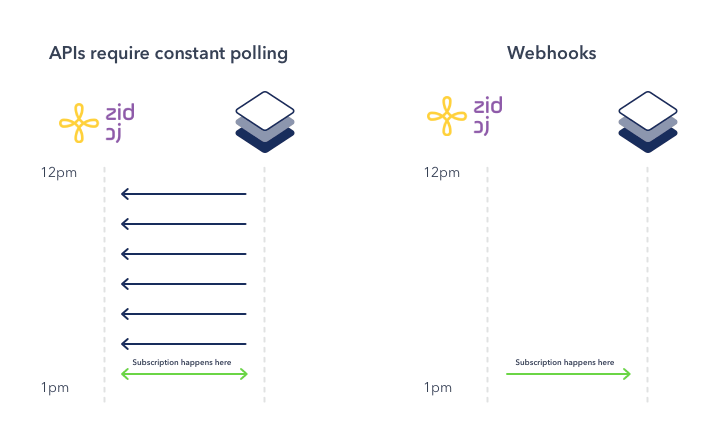
Polling vs. Webhooks#

Polling vs Webhooks

πŸ“Š Polling#

Polling periodically makes requests to check for updates or new data. If new data exists, the system returns it in the response payload. Otherwise, no response is given.

πŸ“¬ Webhooks#

Webhooks simplify tracking data changes by notifying your app directly when status updates occur, reducing the need for repeated calls to our API.

⚠️ Important#

Avoid Frequent Requests: To prevent system overload, please refrain from repeatedly checking for status updates. For tracking order or payment statuses, consider using our robust Webhook APIs instead.
Modified atΒ 2026-05-06 09:28:21
Previous
Responses
Next
Authorization
Built with